
No styles match your search. Try a different word.
A plain name disappears in a kill feed, a friends list, a comment thread. Type your name in the single box above and this stylish name maker rebuilds it with crowns, wings, borders and game-ready fonts, ordered for names first instead of long text. Every build below is a finished name you can copy as it stands, shorten to fit, and paste straight into your game or profile.
A stylish name maker turns one plain name into decorated versions of itself, pairing a fancy font with a small set of symbols like crowns, wings or stars. You type your name once, pick the build that fits your game or profile, copy it, and paste it as your display name.
Built for one name, not a paragraph
This page starts from a different place than a general text tool. The input is one name, the presets aim at name fields, and the styles are ordered the way names are judged: read at a glance, recognised in a list, remembered after one match.
Long flowing fonts that shine on sentences are pushed down the list here. What leads instead are the name fonts, bold and script builds with strong shapes at small sizes, and the decorated wrappers in the Games and Decorated sets above.
The decoration wrappers are part of the engine’s 46 hand-picked designs: crowns above the name, wings at both ends, brackets, borders and clan-tag frames. Each one wraps the same name, so you compare finished identities, not ingredients.
The name formula that works
Strong stylish names are built, not piled up. The formula the presets follow is simple: one readable font, plus one symbol set, plus at most one separator trick.
One font keeps the name a word. Mixing three fonts inside one name turns it into a ransom note, and other players stop reading it as a name at all.
One symbol set keeps the meaning clear. A crown says leader, wings say speed, stars say showpiece. A crown and wings and stars and a border say nothing, louder.
Separators are the quiet third ingredient. A middle dot, an underscore or a small space substitute can split a first and last name or mark a clan tag, and it does more for recognition than another layer of decoration ever will.
Finished names you can copy as they stand
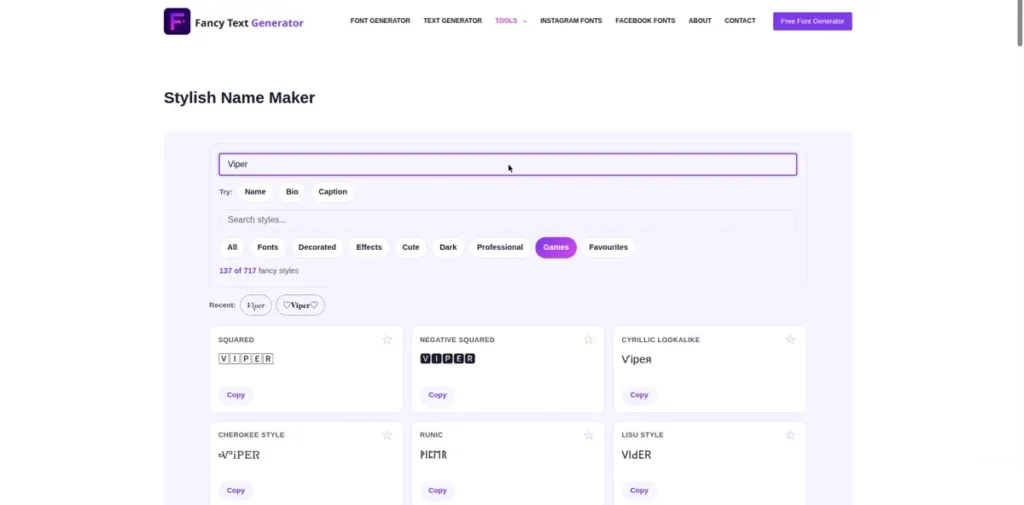
The examples below follow the formula, and each one is short enough for real name fields. Swap in your own name and keep the wrapper.
A crown build for a leader style name: ꧁༺ 𝓚𝓲𝓷𝓰 ༻꧂. A wing build for a fast, light feel: ꧁𖤍 𝘼𝙘𝙚 𖤍꧂. A clean border build that survives almost anywhere: 『 𝗦𝗵𝗮𝗱𝗼𝘄 』.
A clan ready build with the tag up front: ᴛᴇᴀᴍ・𝗩𝗶𝗽𝗲𝗿. And a soft script build for social profiles rather than games: 𝓁𝓊𝓃𝒶 with a single small star at the end, pretty without shouting.
Notice what none of them do: none stacks two heavy wrappers, and none hides the name inside the decoration. If a stranger cannot read your name in two seconds, the build has failed, however good it looks up close.
Length, limits and the fields that say no
Name fields are the strictest text boxes on the internet. Games cap name length, and decorated builds spend that budget fast, because a wrapper that looks like four characters may count as many more underneath.
Count your build before you fall for it. If a game trims names at a set length, the end of a long wrapper is what gets cut, which can leave a name looking unfinished. Shorter cores with one wrapper beat long names with two.
Some fields refuse symbols outright, and some games allow decoration in the display name but not in the login username. That split is normal: the username is an ID and stays plain, while the display name is the costume. This maker’s builds are aimed at the costume layer, and the facebook fonts and what works in Facebook names page explains the same split on Facebook.
When a field rejects a build, simplify in this order: drop the wrapper, keep the font; if it still fails, drop to a plainer font; keep a plain spelling as the final fallback. You lose decoration in steps instead of losing the name entirely.
The same name across games and social apps
Carrying one identity across platforms is the smart play, and it mostly works. A build that fits your game usually pastes cleanly into TikTok and Instagram display names too, since those are display fields, not ID fields.
The trap is the username layer underneath. Handles must be plain letters, numbers and a few marks on nearly every platform, so your stylish build cannot be your handle. Let the handle stay the plain spelling of your name; that is also what friends type when they search for you.
Profile names are the display layer, and the instagram fonts for profile and bio names page covers how fancy letters behave there, including the search side of the choice.
For the lettering itself, the fancy fonts to build a name letter by letter gallery lets you hand-pick an alphabet when the ready builds feel close but not quite yours, and everything here also lives on the fancy text generator for names and everything else, one library for names, bios and posts alike.
Darker identities lean the other way: the glitch text generator for dark and corrupted names adds controlled damage to name builds, and the cool text generator with name-ready decorated styles keeps a trend-led shelf of name builds that this page’s formula can borrow from.
Frequently asked questions
Short answers to the questions readers ask most about stylish names.
How do I make a stylish name that the game actually accepts?
Work in layers and test in the real field. Start with the name in a fancy font and no wrapper, and paste that first. If the game accepts it, add one wrapper and test again. Games reject builds for two usual reasons: the name is too long once the wrapper’s hidden characters are counted, or the field bans symbols entirely. Shortening the core name and keeping a single light wrapper solves most rejections. Keep a plain spelling ready as your final fallback.
Which symbols are safe in PUBG and Free Fire names?
The widely used decorative marks, like crowns, wings, stars and brackets from the standard symbol sets, are the ones players use daily in display names on both games. Safety is never guaranteed, though, because games update their name filters and can tighten rules or rename offensive or broken names later. The honest approach is to pick common marks, avoid symbols that imitate official badges or staff markers, and expect that any build might need adjusting after a game update. The official rules back this caution: PUBG Mobile’s rules of conduct ban offensive or impersonating nicknames and let the game change them, and Free Fire’s abuse policy resets rule-breaking names without warning. If a symbol pastes as a box or a question mark in the name preview, drop it.
Can I use the same stylish name on Instagram and TikTok?
Yes, as your display name on both, and players and creators do it all the time. Display names on Instagram and TikTok accept fancy Unicode letters and common symbols, so a build from this page pastes in as it stands. What cannot match is your username or handle, which must stay in plain letters and numbers on both apps. Keep the handle as the plain spelling of your name so people can search and tag you, and let the stylish build sit on top as the visible name.
Why does my stylish name look broken to other players?
Usually because their device cannot draw one of the characters in it. Every symbol and fancy letter in your name is a Unicode character, and a phone shows a box or a blank where its fonts lack that character. Rare ornaments and newer symbols are the usual casualties, while common crowns, stars and the standard fancy alphabets display almost everywhere. Your own phone shows the name perfectly because it has the fonts, which is why the breakage surprises people. Test a build on a friend’s older phone before you commit to it.